Working with Amino Acids and Post-Translational Modifications using SMILES Notation
This notebook introduces working with amino acids and post-translational modifications on the molecular level, using the SMILES (Simplified Molecular Input Line Entry System) notation. We’ll explore how to represent amino acids, add modifications, and visualize the results using RDKit.
Introduction to SMILES and RDKit
SMILES is a line notation for describing the structure of chemical species using short ASCII strings. For example, the SMILES for ethanol is CCO.
RDKit is an open-source cheminformatics software that we’ll use to work with and visualize molecular structures.
Let’s start by importing the necessary functions and data:
[1]:
from rdkit import Chem
from rdkit.Chem import Draw

from alphabase.smiles.smiles import AminoAcidModifier


aa_modifier = AminoAcidModifier()
modify_amino_acid = aa_modifier.modify_amino_acid
aa_smiles = aa_modifier.aa_smiles
n_term_modifications = aa_modifier.n_term_modifications
c_term_modifications = aa_modifier.c_term_modifications
ptm_dict = aa_modifier.ptm_dict
Understanding the Data Structure
Our data is organized into several dictionaries:
aa_smiles: Contains SMILES representations of amino acidsn_term_modifications: Contains N-terminal modificationsc_term_modifications: Contains C-terminal modificationsptm_dict: Contains post-translational modifications
Let’s examine the SMILES representation of an amino acid, such as Lysine (K):
[2]:
print("Lysine SMILES with dummy atoms:", aa_smiles["K"])
mol = Chem.MolFromSmiles(aa_smiles["K"])
Draw.MolToImage(mol)
Lysine SMILES with dummy atoms: N([Fl])([Fl])[C@@]([H])(CCCCN)C(=O)[Ts]
[2]:
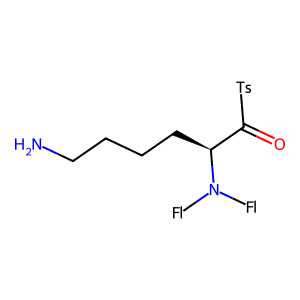
In this SMILES representation:
[Fl]represents placeholder atoms for the N-terminus[Ts]represents placeholder atoms for the C-terminus
These placeholders allow for easy addition of N- and C-terminal modifications.
N-terminal Modifications
Let’s look at the available N-terminal modifications:
[3]:
print("Available N-terminal modifications:")
for mod in n_term_modifications.keys():
    print(f"- {mod}")

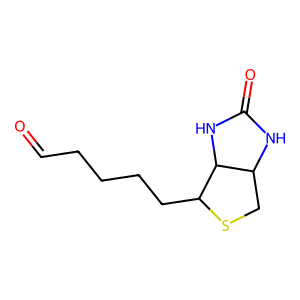
# Let's visualize one of these modifications, e.g., Biotin
print("\nBiotin SMILES:", n_term_modifications["Biotin@Any_N-term"])
biotin_mol = Chem.MolFromSmiles(n_term_modifications["Biotin@Any_N-term"])
Draw.MolToImage(biotin_mol)
Available N-terminal modifications:
- Acetyl@Protein_N-term
- Acetyl@Any_N-term
- Biotin@Any_N-term
- Carbamidomethyl@Any_N-term
- Carbamyl@Any_N-term
- Carbamyl@Protein_N-term
- Propionamide@Any_N-term
- Pyridylacetyl@Any_N-term
- Methyl@Protein_N-term
- Methyl@Any_N-term
- Dimethyl@Protein_N-term
- Dimethyl@Any_N-term
- Propionyl@Protein_N-term
- Propionyl@Any_N-term
- Dimethyl:2H(6)13C(2)@Protein_N-term
- Dimethyl:2H(6)13C(2)@Any_N-term
- Dimethyl:2H(4)@Protein_N-term
- Dimethyl:2H(4)@Any_N-term
- Dimethyl:2H(4)13C(2)@Protein_N-term
- Dimethyl:2H(4)13C(2)@Any_N-term
- mTRAQ@Any_N-term
- mTRAQ:13C(3)15N(1)@Any_N-term
- mTRAQ:13C(6)15N(2)@Any_N-term
- mTRAQ@Protein_N-term
- mTRAQ:13C(3)15N(1)@Protein_N-term
- mTRAQ:13C(6)15N(2)@Protein_N-term
- Biotin@Protein_N-term
- Carbamidomethyl@Protein_N-term
- Propionamide@Protein_N-term
- Pyridylacetyl@Protein_N-term

Biotin SMILES: C(=O)CCCCC1SCC2NC(=O)NC21
[3]:
The modify_amino_acid Function
Now, let’s explore the modify_amino_acid function, which allows us to add modifications to amino acids. This function takes three arguments:
aa_smiles: SMILES string of an amino acidn_term_mod: N-terminal modification (optional)c_term_mod: C-terminal modification (optional)
Let’s see it in action:
[4]:
# Modify Lysine with Biotin N-terminal modification
modified_lys = modify_amino_acid(aa_smiles["K"], n_term_mod="Biotin@Any_N-term")
print("Modified Lysine SMILES:", modified_lys)
mod_lys_mol = Chem.MolFromSmiles(modified_lys)
Draw.MolToImage(mod_lys_mol)
Modified Lysine SMILES: [H]N(C(=O)CCCCC1SCC2NC(=O)NC21)[C@@H](CCCCN)C(=O)O
[4]:
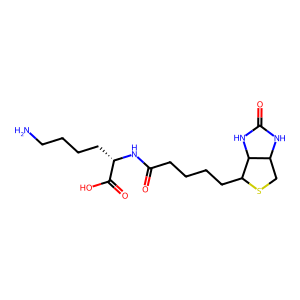
To obtained the unmodified aminoacid, just pass the corresponding SMILES to the function with no additional arguments:
[5]:
non_modified_lys = modify_amino_acid(aa_smiles["K"])
print("Lysine SMILES:", non_modified_lys)
Draw.MolToImage(Chem.MolFromSmiles(non_modified_lys))
Lysine SMILES: [H]N([H])[C@@H](CCCCN)C(=O)O
[5]:
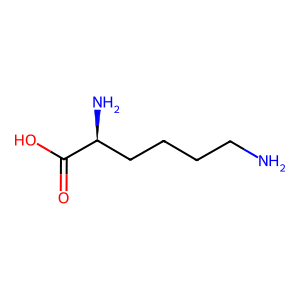
As we can see, the Biotin modification has been added to the N-terminus of Lysine.
Working with Post-Translational Modifications (PTMs)
The ptm_dict contains various post-translational modifications. Let’s examine one:
[6]:
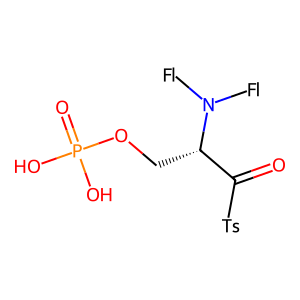
print("Phosphorylated Serine SMILES:", ptm_dict["Phospho@S"])
phos_ser_mol = Chem.MolFromSmiles(ptm_dict["Phospho@S"])
Draw.MolToImage(phos_ser_mol)
Phosphorylated Serine SMILES: O=P(O)(O)OC[C@@H](C(=O)[Ts])N([Fl])([Fl])
[6]:
We can use the modify_amino_acid function with these PTMs as well:
[7]:
# Modify phosphorylated Serine with Acetyl N-terminal modification
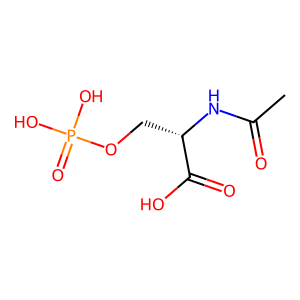
mod_phos_ser = modify_amino_acid(ptm_dict["Phospho@S"], n_term_mod="Acetyl@Any_N-term")
print("Modified Phosphorylated Serine SMILES:", mod_phos_ser)
mod_phos_ser_mol = Chem.MolFromSmiles(mod_phos_ser)
Draw.MolToImage(mod_phos_ser_mol)
Modified Phosphorylated Serine SMILES: [H]N(C(C)=O)[C@@H](COP(=O)(O)O)C(=O)O
[7]:
Conclusion
In this tutorial, we’ve explored how to work with amino acids and post-translational modifications using SMILES notation and the modify_amino_acid function. We’ve seen how to:
Represent amino acids using SMILES
Add N-terminal modifications
Work with post-translational modifications
Visualize molecular structures using RDKit